
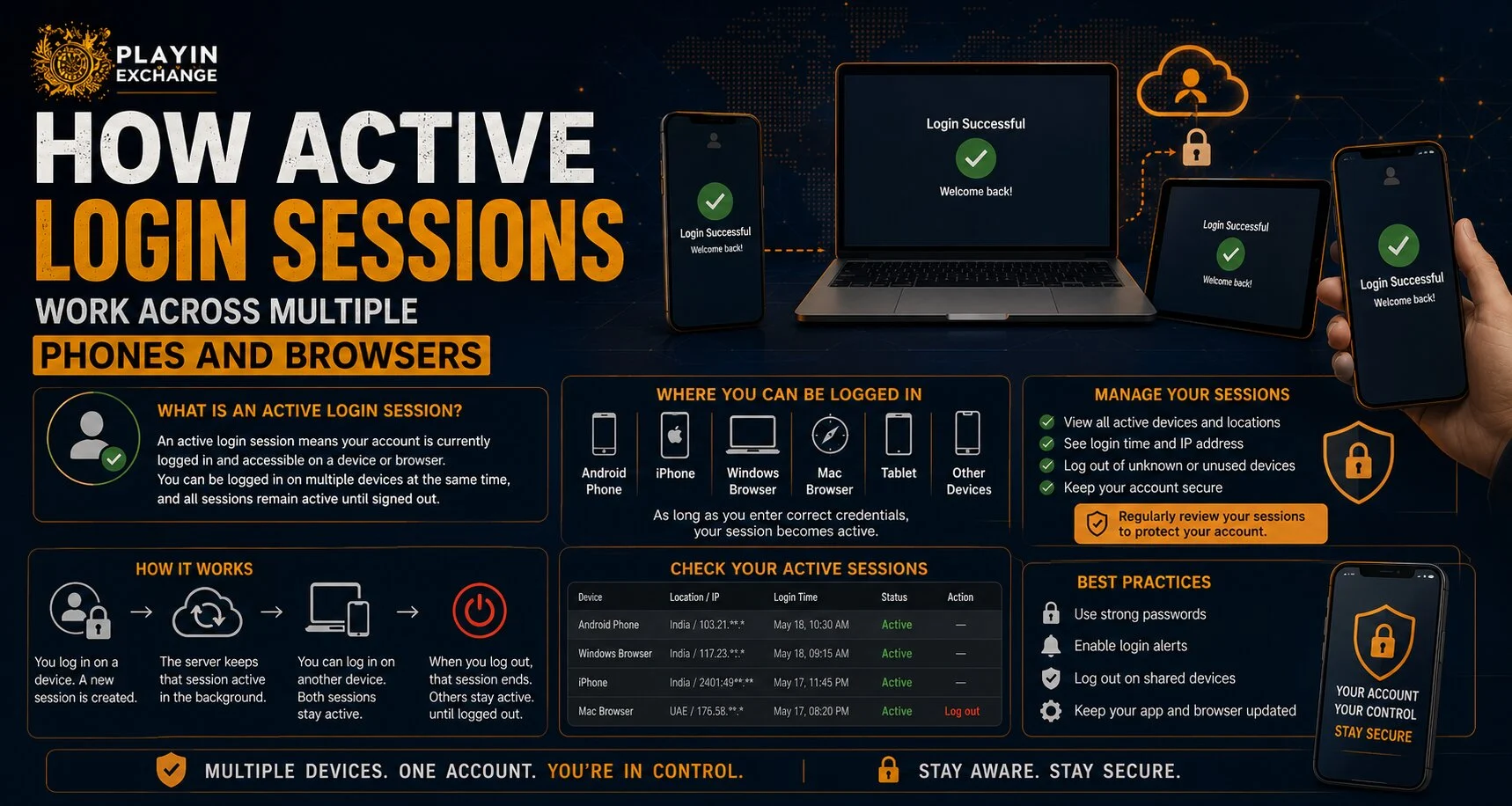
Logging into the same account from more than one phone, tablet, or browser can create multiple active sessions at the same time. For users accessing Playinexch across different devices, understanding how these sessions work is important for account security and access control. A session is essentially a temporary authenticated connection between your device and the platform, allowing you to stay signed in without entering your password every time you open a page.
Knowing how sessions are created, stored, expired, and removed can help users recognize unusual activity and manage their accounts more safely.
What Is an Active Login Session?
An active login session begins after a user successfully verifies their account credentials.
Once the Playinexch Login process is completed, the platform may create a secure session token. This token tells the system that the browser or device has already been authenticated.
A session can contain information such as:
- Device type
- Browser type
- Login time
- Approximate location
- IP address
- Session expiration time
- Security token
The exact information shown to users depends on the platform’s account-security features.
Can One Account Stay Logged In on Multiple Devices?
Yes, depending on the platform’s security policy.
Some websites allow the same account to stay logged in across several devices. For example, you might remain signed in on:
- A personal smartphone
- A desktop browser
- A tablet
- A second browser on the same computer
Other services may automatically log out older sessions when a new device is used.
Users accessing Play Exchange services should therefore check whether the account includes a device-management or active-session section.
Why Does a Browser Count as a Separate Session?
A session is usually connected to a browser environment rather than simply the physical device.
For example, logging in through Chrome and Firefox on the same laptop can create two separate sessions.
Similarly:
- Chrome normal mode may have one session.
- Incognito mode can create another temporary session.
- A mobile app may have its own session.
- A mobile browser may create a separate session.
This explains why your Playinexch ID might appear active in several places even when you personally used only one phone or computer.
How Do Websites Remember That You Are Logged In?
Websites generally use secure session cookies or authentication tokens.
After successful authentication, the browser stores a small piece of information that helps prove the session has already been verified.
The password itself should not need to be transmitted repeatedly with every page request.
A typical process looks like this:
- User enters login credentials.
- The server verifies them.
- A session token is created.
- The browser stores the token.
- The token is checked during later requests.
- The session expires or is manually ended.
Users with a Playinexch Online ID should avoid copying authentication data or browser cookies between devices.
What Happens When You Log Out?
Logging out normally invalidates the session used on that browser or device.
However, pressing “Logout” on one phone may not necessarily close sessions running on every other device.
Platforms with enhanced security may provide options such as:
- Log out of this device
- Log out of all devices
- Remove selected session
- Sign out everywhere
If you are concerned that someone else has account access, using a “log out all sessions” option is generally more useful than signing out from only the current browser.
When Do Active Sessions Expire Automatically?
Sessions do not normally remain active forever.
They may expire because of:
- Long periods of inactivity
- A fixed security time limit
- Password changes
- Security-policy updates
- Suspicious login detection
- Manual account logout
- Browser cookies being deleted
Some platforms also require users to log in again before performing sensitive actions.
This helps reduce the risk if an unlocked device is left unattended.
What Happens After Changing Your Password?
Changing a password can affect existing sessions differently depending on the website.
A security-focused platform may immediately invalidate all previous sessions. Other services may allow existing sessions to remain active until they expire.
After changing a password because of suspected unauthorized access, users should also check for an option to close every active session.
This ensures that someone already signed in with an older session cannot continue using the account.
How Can You Recognize an Unfamiliar Session?
If an account includes session-management tools, review the listed devices regularly.
Warning signs can include:
- A browser you do not recognize
- A phone model you have never used
- Login times when you were not online
- Unexpected geographic locations
- Several simultaneous sessions you cannot explain
Remember that approximate location information based on IP addresses can sometimes be inaccurate, so a different nearby city does not automatically prove unauthorized access.
What Should You Do If a Session Looks Suspicious?
Take action quickly.
Useful security steps include:
- Log out the unfamiliar session
- Use “log out all devices” if available
- Change your account password
- Use a unique password not used elsewhere
- Review registered mobile and email details
- Enable additional authentication if supported
- Contact official account support if access continues
Never share passwords, verification codes, or recovery details with someone claiming to help remove an unwanted session.
Are Shared Phones More Risky?
Yes. Shared devices can make active sessions particularly important.
If a user signs into an account and closes the browser without logging out, the next person using the device may still have access.
Users should avoid choosing options such as “Remember Me” on shared phones or computers.
When using a shared device:
- Use private browsing where appropriate
- Do not save passwords
- Log out after finishing
- Clear session data if necessary
- Never leave the device unattended while signed in
These precautions help protect account access.
Conclusion
Active login sessions allow users to remain authenticated across phones, apps, and browsers without repeatedly entering credentials. Each browser or device can potentially create its own session, depending on the platform’s security rules.
Users should regularly review active devices, log out unused sessions, and close all sessions if suspicious activity appears. Understanding how login sessions work is a simple but valuable part of maintaining better account security.
Frequently Asked Questions
Can I stay logged in on two phones at the same time?
Possibly. It depends on whether the platform allows multiple simultaneous sessions.
Does logging out on one phone log me out everywhere?
Not always. Some services log out only the current session unless you choose a “log out all devices” option.
Why do two browsers appear as separate sessions?
Each browser stores its own session token, so Chrome and Firefox on the same device may be treated separately.
Does changing my password close old sessions?
It depends on the platform. For security, check whether you can manually terminate all active sessions after changing the password.
What should I do if I see an unknown device?
Log out the unfamiliar session, change your password, review your account details, and contact official support if necessary.
Is it safe to stay logged in on a shared phone?
It is safer to log out after every use and avoid saving passwords or persistent login details on shared devices.


